
At a Glance
AI shopping assistants can help you save money by finding suitable products, comparing prices, spotting potential discounts, and helping you avoid unnecessary purchases. Tools like ChatGPT and Google Gemini can make shopping research much easier, but they aren’t guaranteed to find the cheapest or most reliable deal. The trick is knowing what to ask, which information to trust, and what to check before paying.
By the End of This Article, You’ll Know:
- How to start shopping with AI, even if you’ve never tried it.
- How to get better recommendations without wasting money on unnecessary features.
- How to compare prices and uncover hidden costs.
- How to spot misleading recommendations, reviews, and discounts.
- How to use AI shopping tools without putting your money at unnecessary risk.
- How to decide whether a purchase is genuinely worth it.
What If AI Could Do Your Shopping Homework?
You need a new laptop.
Sounds simple, right?
Then you open Amazon. Best Buy has another offer. Walmart has a different model. One reviewer loves the laptop you’re considering, while another says it’s the worst purchase they’ve ever made.
Before you know it, you’ve got 15 browser tabs open and more questions than answers.
What if you could skip most of that research?
Imagine asking an AI shopping assistant:
“Find me three reliable laptops under $900 for everyday work. Compare their battery life, performance, warranty, and price, and tell me which offers the best value.”
Within moments, you could have a shortlist instead of a mountain of search results.
That’s the promise of AI shopping assistants.
But here’s something worth knowing before you get too excited.
AI can help you find a deal. That doesn’t necessarily mean it’s found the best deal.
In an October 2026 investigation, consumer organization Which? tested ChatGPT’s ability to find the lowest prices for 25 popular products. It correctly identified the lowest price and retailer for only eight of them.
The investigation also uncovered incorrect prices and recommendations for the wrong products.
That’s quite a reminder that a confident AI answer isn’t always a correct one.
Still, AI can be an excellent shopping companion when you know how to use it.
Here are seven ways to make it work for your wallet.
1. What Is an AI Shopping Assistant, and How Do You Start Using One?
An AI shopping assistant is a tool that helps you find, compare, and understand products through a simple conversation.
Instead of searching for “best vacuum cleaner 2026” and scrolling through endless results, you can describe what you actually need.
For example:
“I have two dogs, mostly carpeted floors, and a $250 budget. What kind of vacuum cleaner should I buy?”
An AI assistant can explain which features matter, suggest suitable products, and help you compare alternatives.
You don’t have to understand every technical specification beforehand.
And you don’t need to know any complicated commands.
Which AI Shopping Assistant Should You Try?
There are several options.
ChatGPT can help you research products, compare specifications, and organize shopping options.
Google Gemini can assist with product research and shopping-related questions, including through supported Google shopping experiences.
Microsoft Copilot can also help you explore products and understand their differences.
Some retailers offer their own AI shopping assistants, too. Amazon’s Rufus, for example, is designed around shopping within Amazon’s marketplace.
The available features vary by tool, region, and account.
Google CEO Sundar Pichai described the shift toward conversational shopping in January 2026:
“AI can do the hard work of narrowing down exactly what you’re most interested in buying.”
And that’s probably the most useful way to think about these tools.
They help you narrow the search, not automatically make the right decision.
Your First AI Shopping Search
Getting started is surprisingly straightforward.
Open an AI assistant that supports product research and type something like:
“I’m buying a coffee maker for under $100. I want something easy to clean, reliable, and suitable for two people. Suggest three options and explain the differences.”
Once you receive recommendations, ask a follow-up:
“Which one would you choose for someone who values reliability over fancy features?”
Then request retailer links and check the current listings.
That’s it. You’ve completed your first AI-assisted product comparison.
And now comes the part where things get even more useful.
2. How Do You Get AI to Recommend Products That Are Actually Worth Your Money?
Here’s a little secret about shopping.
Sometimes we spend more because we’re buying features we don’t actually need.
Think about smartphones.
You walk into a store wanting a reliable phone for messaging, photos, and everyday browsing.
An hour later, you’re considering a premium model with professional video features, advanced camera controls, and more processing power than you’ll probably ever use.
It’s easy to get carried away.
AI can help you avoid that, but only if you give it the right instructions.
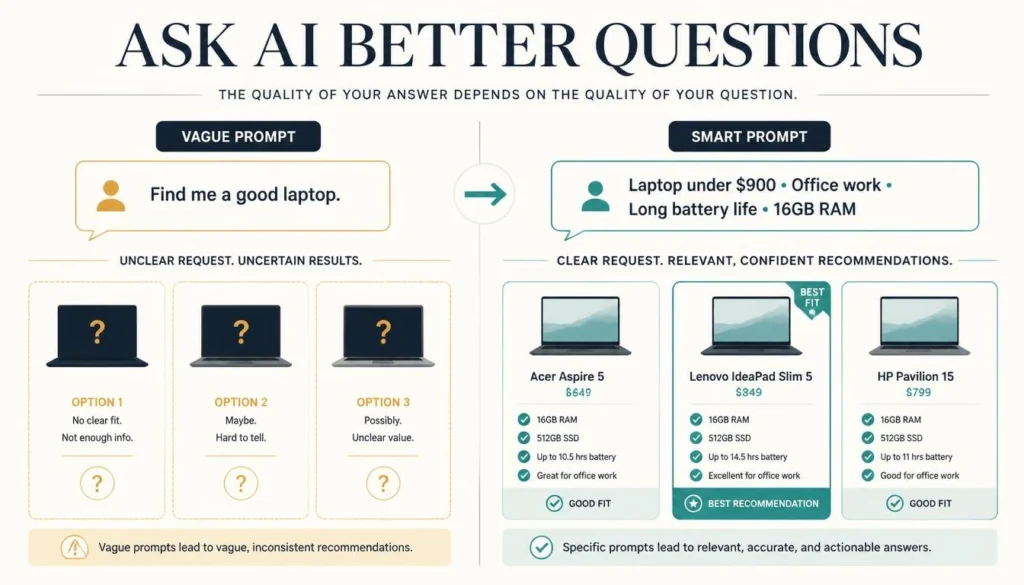
Don’t Ask for the Best Product. Ask for the Best Product for You.
Compare these two questions.
Question A: “What’s the best laptop?”
Question B: “What’s the best laptop under $900 for office work, video calls, and browsing? I care about battery life and reliability more than gaming performance.”
The second question gives AI something important: context.
It knows your budget, how you’ll use the laptop, and what matters most.
That makes it easier to identify products that fit your needs rather than simply recommending expensive models.
Try the Question That Could Save You the Most
After AI recommends something, ask:
“What features am I paying extra for that I probably won’t use?”
Suppose you’re comparing two smartphones.
One costs $650. The other costs $900.
The more expensive model might offer advanced photography tools and extra processing power.
But if you mainly use your phone for social media, video calls, and occasional photos, those upgrades may not justify the extra expense.
AI can explain the trade-offs in plain English.
You might discover that the less expensive model does everything you need.
The lesson? You don’t always need a better discount. Sometimes you just need a better buying decision.
3. How Can AI Help You Compare Prices and Uncover Hidden Costs?
Let’s say you’ve finally chosen your laptop.
Now you want to find the best deal.
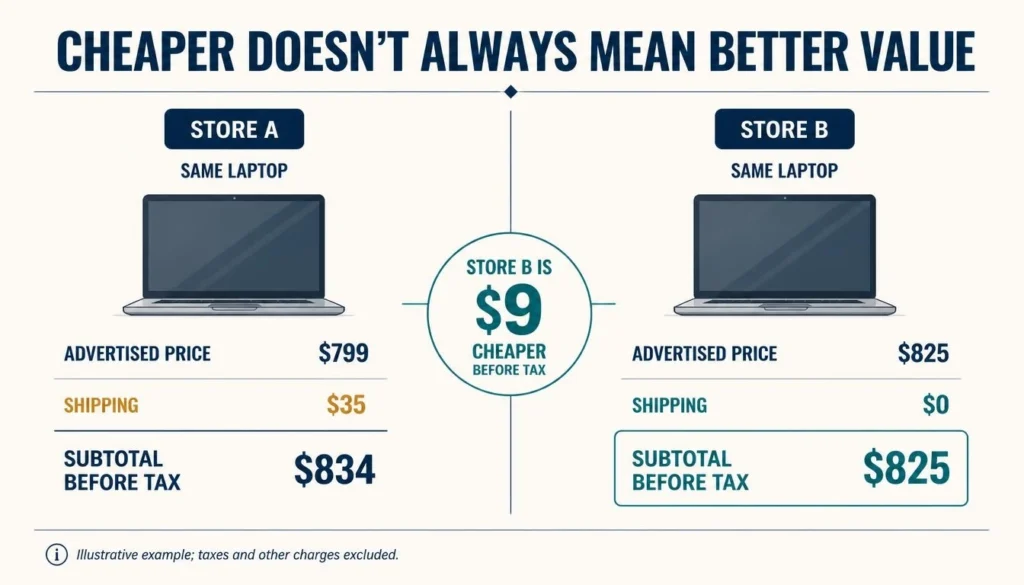
You discover the same model at two stores.
One advertises a lower price. The other includes free delivery and a more generous return policy.
Which one should you choose?
Not so fast.
The lowest advertised price isn’t always the lowest total cost.
Shipping charges, taxes, mandatory fees, and return costs can change the picture.
Ask AI to Compare What You’ll Actually Pay
Instead of asking:
“Where’s this laptop cheapest?”
Try:
“Compare the total cost of this exact laptop model across reputable retailers. Include shipping, estimated taxes where available, warranty coverage, and return policies. Tell me which details I still need to verify.”
This encourages a more useful comparison.
And there’s another detail many shoppers overlook.
Make Sure You’re Comparing the Same Product
Two laptops can look almost identical but have different specifications.
One might have 16GB of RAM.
Another might have only 8GB.
The product names could be nearly identical, making the cheaper one appear to be a bargain.
Ask AI to compare the exact model numbers, not just the brand names.
The Federal Trade Commission recommends checking product details, total costs, seller information, and return policies when comparing online purchases.
Here’s an additional trick: if a reputable retailer offers price matching, ask AI to help you find the policy and identify what evidence you need.
You may be able to get a competitive price without sacrificing the retailer or return policy you prefer.
The takeaway: Don’t ask AI to find the lowest price. Ask it to help find the best complete offer.
4. Can You Trust AI Shopping Recommendations? Here’s How to Catch Mistakes
AI has an interesting talent.
It can make an answer sound convincing even when some details are wrong.
That can be particularly frustrating when you’re shopping.
Imagine asking AI to find a television with a particular screen size and display technology.
It recommends a model, explains its features, and quotes an attractive price.
Everything sounds perfect.
Until you open the retailer’s website.
The price is different.
Or the product is a smaller version.
Or the model is no longer available.
These aren’t merely hypothetical concerns.
In its October 2026 investigation, Which? found that ChatGPT sometimes returned incorrect prices, overlooked cheaper retailers, or confused similar products.
So how do you avoid buying the wrong thing?
Use the AI Shopping Reality Check
This is one of the most useful habits you can develop.
After receiving a recommendation, ask:
“Give me three reasons this product might be a bad choice for me. What information should I verify before buying it?”
It’s a simple question, but it changes the conversation.
Instead of asking AI to keep selling you on a recommendation, you’re asking it to examine the weaknesses.
It might highlight limited warranty coverage, poor battery life, expensive replacement parts, or missing features.
Of course, those claims still need checking.
Check the Three Things That Matter Most
First, visit the manufacturer’s website to confirm the specifications.
Next, read independent reviews from sources that explain how products were tested. Look for recurring complaints, not just star ratings.
Finally, investigate the seller. A genuine product listed by an unreliable retailer can still become an expensive headache.
The FTC specifically warns consumers not to rely on star ratings alone because some online reviews can be fake or misleading.
And here’s another useful question to ask AI:
“Which complaints about this product appear repeatedly across credible independent reviews? Include sources, and don’t invent complaints.”
That can help you identify what deserves closer investigation.
Remember, a useful AI shopping assistant should help you understand why not to buy something, too.
5. How Can You Use AI to Find Real Discounts Instead of Fake Bargains?
You’ve probably seen an online offer that looks impossible to ignore.
50% OFF!
TODAY ONLY!
LIMITED STOCK!
Suddenly, a product you weren’t even thinking about buying starts looking irresistible.
But there’s a problem.
A large discount doesn’t necessarily mean a genuinely low price.
Here’s How a Discount Can Mislead You
Imagine a television advertised for $600, supposedly reduced from $1,000.
That looks like an incredible saving.
But what if the television normally sells for around $650?
Now the deal doesn’t seem nearly as impressive.
In May 2026, consumer organization Which? reported examples of potentially misleading reference prices on major online marketplaces.
The lesson is simple: don’t judge a deal by the percentage on the banner. Judge it by what the product usually costs.
Let AI Help You Investigate the Discount
Ask:
“This television is advertised at 40% off. Help me find reliable price-history information for the exact model and check whether the current price is competitive.”
If you’re shopping on Amazon, price-tracking services such as Keepa or CamelCamelCamel can help you investigate historical prices for supported products.
For example, you can look up a compatible Amazon product in a price tracker and examine whether the current price is unusually low or similar to its recent selling price.
AI can help you interpret that information.
But don’t assume it has access to a complete price history unless it provides a reliable source.
What About Coupons?
You can also ask AI:
“Find currently advertised coupons or promotions for this product from reputable retailers. Include the conditions and sources.”
Then verify the offer directly.
AI can suggest expired codes or promotions that don’t apply to your purchase.
And there’s one final rule worth remembering.
Buying something you didn’t need just because it’s discounted isn’t saving money. It’s spending money.
Sometimes the smartest shopping decision is simply closing the tab.
6. Is AI Shopping Safe? What Should You Check Before Letting AI Buy Anything?
So far, we’ve talked about AI helping you research products.
But what happens when AI starts doing more than research?
What if your assistant can select a product, fill your cart, and help complete checkout?
Welcome to the world of agentic commerce.
It sounds futuristic, but the idea is straightforward.
Instead of simply suggesting what you should buy, an AI agent may be able to perform shopping actions on your behalf, depending on the service and permissions you grant.
That could make routine purchases much easier.
But it also raises an important question:
How much control are you comfortable giving away?
Convenience Is Great. Unexpected Charges Aren’t.
Imagine asking an AI agent to reorder your usual household supplies.
You expect it to find the same products at reasonable prices.
But what if your preferred brand is unavailable?
Should it choose a substitute?
What if the replacement costs considerably more?
Should it complete the purchase anyway?
These are the kinds of decisions you should think about before authorizing automated shopping.
Kate Muhl, VP Analyst at Gartner, captured the consumer preference in a May 2026 statement:
“Consumers are not looking to outsource shopping decisions to AI.”
Gartner’s research found that shoppers were generally more comfortable using AI to narrow product choices than allowing it to make purchasing decisions for them.
Five Things to Check Before AI-Assisted Checkout
1. Who approves the purchase? Choose settings that require your confirmation before payment whenever possible.
2. Can you restrict spending? Review any available spending limits, merchant restrictions, or purchasing permissions.
3. What happens if the product changes? Check whether substitutions, quantities, and prices require fresh approval.
4. Who handles refunds? Understand the merchant’s return policy and how disputes are handled through the service.
5. How is your payment information protected? Use legitimate services, review account security, and avoid sharing sensitive credentials unnecessarily.
For ordinary purchases, using AI for research while completing checkout yourself may be the simplest option.
If you’re curious about how AI agents can participate in payments, our Finpearls guide to agentic payments explains the concept in more detail.
The goal isn’t to avoid new technology.
It’s to make sure convenience doesn’t come at the expense of control.
7. How Do You Know If AI Actually Saved You Money?
Let’s imagine AI helps you find a laptop for $600.
Another laptop costs $750.
Naturally, the cheaper one looks more attractive.
But suppose the $600 model struggles with the applications you need, has poor battery life, or lacks important features.
Is it still the better deal?
Maybe not.
Saving money isn’t simply paying less. It’s getting what you need without spending more than necessary.
This is where AI can be surprisingly useful.
Rather than asking it to find another discount, ask it to help you evaluate the purchase itself.
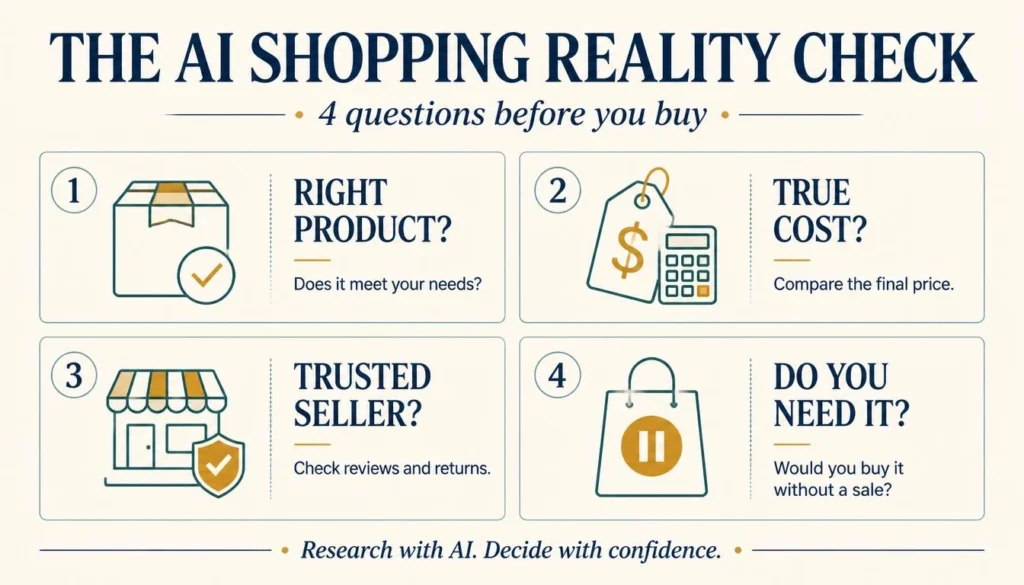
Try the Four-Question Value Test
Before buying, ask yourself:
Does it actually meet my needs? A cheap product that doesn’t do the job isn’t good value.
Is the total price competitive? Check the exact model and the final amount payable.
Can I trust the seller? A slightly higher price from a reputable retailer may be preferable to an uncertain bargain.
Would I buy it without the discount? This is particularly useful for avoiding impulse purchases.
Now ask AI one final question:
“Based on my needs and budget, is this genuinely good value? What would make you recommend against buying it?”
You might discover a better alternative.
Or you might realize the product you originally chose is perfectly suitable.
Either outcome is useful.
And sometimes the best result is deciding to wait.
Because the point of AI shopping isn’t to buy more things.
It’s to make better decisions about the things you buy.
Bonus: The AI Shopping Prompt You Can Copy and Use Today
Ready to try everything you’ve learned?
Here’s a prompt you can paste into an AI assistant and customize for your next purchase.
Copy this AI shopping prompt:
Act as my shopping research assistant.
I’m looking for [PRODUCT] with a maximum total budget of [AMOUNT].
I’ll use it mainly for [PURPOSE]. My must-have features are [FEATURES], and the things I care most about are [PRIORITIES].
Recommend three products that fit my needs and explain the main advantages and disadvantages of each.
Where current shopping information is available, compare reputable retailers, exact model numbers, prices, shipping costs, warranties, and return policies. Include source links.
Help me identify genuine discounts, better-value alternatives, and features I may be paying extra for unnecessarily.
Don’t invent prices, product specifications, reviews, or coupon codes. Clearly tell me what you cannot verify.
Finally, challenge your top recommendation. Give me three reasons it might not be the right purchase and explain what I should check before buying.
Do not place an order, authorize a payment, or make any purchase on my behalf.
You don’t need to use every part of this prompt for a small purchase.
But for expensive items such as laptops, smartphones, appliances, or furniture, a little extra research can be worthwhile.
The Bottom Line: Let AI Do the Research, Not All the Thinking
The next time you’re about to buy something online, try something different.
Instead of opening ten shopping tabs, tell an AI assistant what you need, what you can afford, and what matters most.
Let it narrow your options.
Ask it to explain the trade-offs.
Then do something especially important: challenge its recommendation before you spend your money.
You don’t need AI to make every decision for you.
You need it to make those decisions easier, clearer, and better informed.
And if it helps you avoid an unnecessary upgrade, spot a misleading discount, or choose a product that genuinely suits your needs?
That’s a pretty good use of technology.
The smartest AI shopper isn’t the person who lets AI buy everything. It’s the person who knows when to use AI and when to trust their own judgment.
Frequently Asked Questions
What Is the Best AI Shopping Assistant?
There isn’t one best tool for every shopper. ChatGPT, Google Gemini, and Microsoft Copilot can help with product research and comparisons. Retailer-specific assistants and dedicated price trackers may be more useful for particular stores or price histories. Choose based on the task and the tool’s available features.
Can ChatGPT Find the Cheapest Price Online?
ChatGPT can help identify products and compare offers when appropriate search or shopping features are available. However, it doesn’t guarantee the lowest price across every retailer. Independent testing has found incorrect or outdated prices, so check current retailer listings before buying.
Is It Free to Use AI for Shopping?
Many AI assistants provide free product-research capabilities, although advanced features, usage limits, and shopping integrations may depend on your account or subscription. Some specialized price-tracking services also offer free and paid features.
Can AI Shopping Assistants Find Working Coupons?
They can help locate advertised promotions and potential coupon codes, but they cannot guarantee every code will work. Some offers are expired, restricted, or product-specific. Confirm the discount and its conditions at the retailer’s checkout.
Are AI Shopping Assistants Safe?
AI shopping assistants can be useful for research, but safety depends on the tool, the retailer, and the permissions you grant. Verify sellers, protect sensitive information, and review payment details before approving purchases.
Can AI Buy Products Without My Permission?
Some AI shopping tools only provide recommendations, while others support purchasing actions after you grant authorization. The exact controls vary. Review permissions, spending settings, and approval requirements before enabling any automated purchasing feature.